View source content for Link & Document data sources
We’ve just released a new Knowledge Base feature that gives you full visibility into how your data is processed by Chatling.
You can now view the exact content extracted and stored from Links and Documents (PDF, Word, TXT, etc.). This helps you see precisely what your AI is learning from each source, no more guessing.
This change applies to data sources added to the knowledge base starting today. Existing data sources will not display the source content unless you resync them.
How to use it
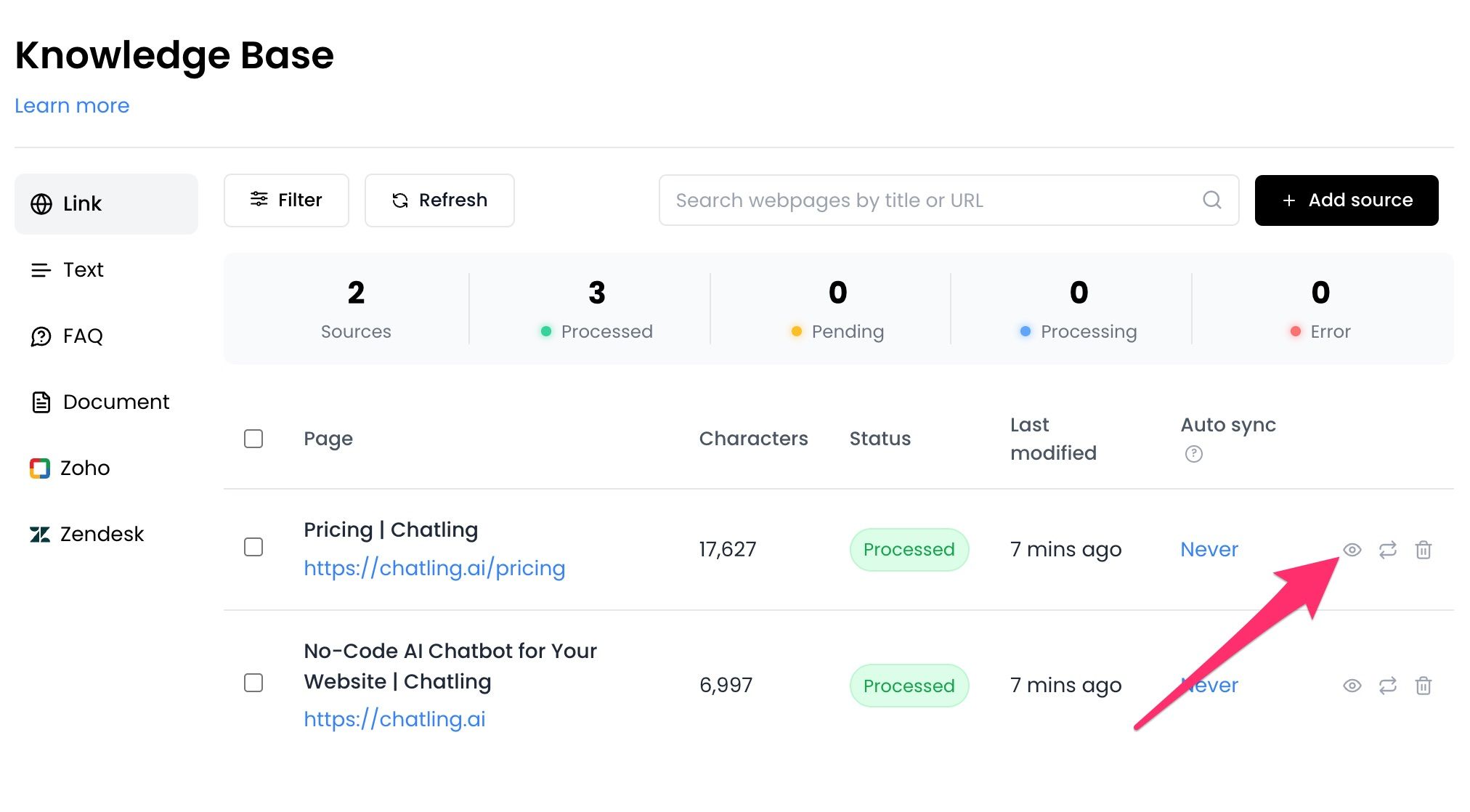
Go to Knowledge Base, open the Link or Document tab, then click the view icon next to a data source to view its processed content, as shown below.
Why this matters
This update was built to give you more transparency and control over your AI’s knowledge:
✅ Understand how a page or document was parsed
✅ Verify that important sections were captured correctly
✅ Spot missing, noisy, or irrelevant content early
✅ Debug unexpected AI responses faster
✅ Build trust in what your AI actually “knows”